Wednesday, August 25, 2010

SDC Tasks Failed to Update IIS website on Windows Server 2008 R2 IIS7

I just moved a website to IIS 7 on Windows Server 2008 R2 and the automate deployment builds failed to update IIS to set the website in maintenance mode (app offline) by simply changing the website path using the SDCTasks.

Error:


A task error has occured. Message = Unknown error (0x80005000) MachineName = \\LOCALQA01 HostName = Description = acme.com Path = D:\websites\app_offline\acme Identifier = AuthFlags = AppPoolId = AnonymousUsername = AnonymousPassword = HttpExpires = DirBrowseFlags = DefaultDocs = at System.DirectoryServices.DirectoryEntry.Bind(Boolean throwIfFail) at System.DirectoryServices.DirectoryEntry.Bind() at System.DirectoryServices.DirectoryEntry.get_IsContainer() at System.DirectoryServices.DirectoryEntries.ChildEnumerator..ctor(DirectoryEntry container) at Microsoft.Sdc.Tasks.Configuration.Web.WebSite.GetIdentifierFromDescription(String machineName, String description) in c:\projects\codeplex\sdctasks\Solutions\Main\Tasks\Configuration\Web\WebSite.cs:line 264 at Microsoft.Sdc.Tasks.Configuration.Web.WebSite.Exists(String machineName, String description) in c:\projects\codeplex\sdctasks\Solutions\Main\Tasks\Configuration\Web\WebSite.cs:line 241 at Microsoft.Sdc.Tasks.Web.WebSite.Modify.InternalExecute() in c:\projects\codeplex\sdctasks\Solutions\Main\Tasks\Web\WebSite\Modify.cs:line 225 at Microsoft.Sdc.Tasks.TaskBase.Execute() in c:\projects\codeplex\sdctasks\Solutions\Main\Tasks\TaskBase.cs:line 67

I did just digging around and finally go to the real issue. Looks like DirectoryServices which is what SDC tasks uses to update the IIS was the caused of this problem.
I created a simple consolde app to try updating the website with DirectoryServices:


static void Main(string[] args)
{

try
{

string MachineName = "LOCALQA01";
var Identifier = GetIdentifierFromDescription("LOCALQA01", "Acme.com").ToString();
string path = @"D:\websites\app_offline\Acme";

// load the site
DirectoryEntry site = new DirectoryEntry("IIS://" + MachineName + "/w3svc/" + Identifier + "/ROOT");

// make the changes we need to make
if (!string.IsNullOrEmpty(System.IO.Path.GetFullPath(path)))
{
// Log.LogMessage(string.Format("Setting Path: {0}", path));
site.Properties["Path"][0] = path;
}
site.CommitChanges();

Console.WriteLine(Identifier);

}
catch(Exception ex){
Console.WriteLine(ex.ToString());

}

Console.ReadLine();
}

public static int GetIdentifierFromDescription(string machineName, string description)
{
// load the W3SVC and check all the children for a property that matches

DirectoryEntry de = new DirectoryEntry("IIS://" + machineName + "/W3SVC");

foreach (DirectoryEntry o in de.Children)
{
if (o.SchemaClassName == "IIsWebServer")
{
if ((string)o.Properties["ServerComment"][0] == description)
{
return Convert.ToInt32(o.Name);
}
}
}
return 0;
}


Bu when I run this from the build machine I was then getting this error:

[System.Runtime.InteropServices.COMException] {"Unknown error (0x80005000)"}
System.Runtime.InteropServices.COMException

Unknown error (0x80005000)
at System.DirectoryServices.DirectoryEntry.Bind(Boolean throwIfFail)
at System.DirectoryServices.DirectoryEntry.Bind()
at System.DirectoryServices.DirectoryEntry.get_IsContainer()
at System.DirectoryServices.DirectoryEntries.CheckIsContainer()
at System.DirectoryServices.DirectoryEntries.Find(String name, String schemaC
lassName)


Without going to further details the caused of this error was because I did not had IIS 6 Metabase Compability role service installed for IIS7 on the build machine where I was running the scripts from. You can installed this by going to :

Server Manager > Roles> Web Server (IIS) > Add Role Services
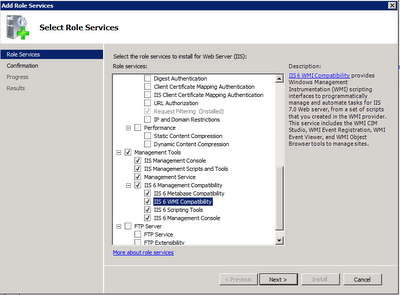


After you fix this and still have issues probably the next error will be "Access Denied".
This is because of the UAC in Windows Server 2008 R2 which is annoying if you ask me. You can then make the account service that runs your builds local admin on the server your trying to update. This will take care of the issue. Or you can just disable the UAC and be done with it.

Hope this helps.

Thursday, August 19, 2010

How to disable flash debugger Error Messages in FireFox

If you have the flash debugger installed or have Flash or Flex builder you will get annoying error messages from many of the websites that you visit today where developers have errors in their flash applications.

You can disable this by creating a file mm.cfg under your users settings folder

Windows Vista / Windows 7:
c:\users\\mm.cfg

Windows XP:
c:\Documents and Settings\

OS X:
/Library/Application Support/Macromedia

Enter this in this file and save it.

SuppressDebuggerExceptionDialogs=1

Restart Firefox and the errors will no longer show.
If you need to display the debugger error messages set the value to:

SuppressDebuggerExceptionDialogs=0

Wednesday, August 11, 2010

IIS 7 WebResource.axd forbidden Windows Server 2008

New site deployment using IIS 7.5 on Windows Server 2008 R2.


HttpException: Because your server does not support reflection or you set the attribute 'reflectionAlloweded="false"', You must specify a non-autogenerated machine key in your web.config to compress Webresource.axd


System.Web.HttpException
Mensagem: Because your server does not support reflection or you set the attribute 'reflectionAlloweded="false"', You must specify a non-autogenerated machine key in your web.config to compress Webresource.axd
Source: MbCompression
at Miron.Web.MbCompression.WebResourceCompressionModule.ThrowHttpException(Int32 num, String SRName)
at Miron.Web.MbCompression.WebResourceCompressionModule.GetDataFromQuery(NameValueCollection queryString)
at Miron.Web.MbCompression.WebResourceCompressionModule.OnPreRequestHandlerExecute(Object sender, EventArgs e)
at System.Web.HttpApplication.SyncEventExecutionStep.System.Web.HttpApplication.IExecutionStep.Execute()
at System.Web.HttpApplication.ExecuteStep(IExecutionStep step, Boolean& completedSynchronously)


This issue is generated via the MbCompression library used to dynamically compress requests for Javascript files including the WebResources in asp.net 2.
My web.config does not have any configuration settings in the web.config for the Mbcompression library. The solution is very simple and was fixed by adding the Machinekey in the web.config in the section.

Thursday, July 29, 2010

IIS 7.5 Windows Server 2008 R2: Access Denied Permissions

I'll just be short about this error. New to IIS 7.5 Windows Server 2008 R2 and have issues with permissions write access on folders that the application is using?

Write Access to folders will not cut it by simply giving permissions to IUSR or IIS_IUSRS group.

If the application pool is using “ApplicationPoolIdentity” this means that the application pool has its own user account.

You need to add the App Pool use to that folder and give it access.


Wednesday, July 28, 2010

Puerto Vallarta Apartments is now in English

My website Puerto Vallarta Bienes Raices is now available for the English speaking visitors to find Properties for Sale or Rent in Puerto Vallarta, Condos or Homes in Sayulita, or find homes, condos, apartments in other near by areas such as Bahia de Banderas, Nayarit.
It took me about total of 2 weeks on part time basis to localize and translate all text and images in English but it all pays at the end. I used tools from ReSharper Jetbrains that allow me to easily extract strings in spanish and move then to resource files to be translated into English. I want to offer a website for native English speakers in the USA and Canada to easily locate vacation rentals for their vacations in Puerto Vallarta or to find their retirement home in Sayulita which a very nice community as well as Punta de Mita with great real estate properties.

Please feel free if you have any comments or suggestions about the this website. I am open to hear from any one.

Tuesday, July 27, 2010

Verizon's Router has issues when you connect 3 or more devices drops Internet Connections

Recently I have been working from home for often and got another computer connected in my LAN network. After this change I started noticing internet drops very often. So I contacted Verizon Technical Support (let me say that I hate Verizon’s call centers, you have to enter a hundred keys to get to the right agent). Any ways, tech support did some trouble shooting and made changes to the router etc. Problem still persists.

I called again, they send a technician to troubleshoot it and he just replaced the router and was out of the door in less than 5 minutes. OK it was fine for 2-3 days and then the problem again.

I called tech support again and yes again they send over another technician which he just change my router from Ethernet to Coax cable. It was good for 1 day and then the problem as still going on. The internet was dropping every 5 minutes. It was actually recycling the entire router powering itself on and off. I had three machines connected via Ethernet cable and 2 devices on the wireless network. Normal activities except for one machine which I might be transferring 1-2 Gigs of data, but noticed that the drops were occurring even If I wasn’t at home, as long as the computers where connected the internet was dropping. By this time I was already in the 3rd router.

Technical support sent another technical and he stayed for a while until he visually saw the drops himself. This time he decides to replace the box outside and put in a brand new router (same router of course Verizon only carries one type of router). Any ways I believe it worked at least for 4-5 days and Yes again the same problem. This was a nightmare I could not do my work and it was embarrassing with my clients when I had video conference calls and online meetings since it will drop my internet connecting on random times.

Frustrated, I called Technical support again and they put their Special Team on the line and said that it might be a problem on their central office so they said they were going to change me to another slot. That probably means to another server. Not sure but it worked for 1 day and still the same problem. Finally they send another technical to my house again and said dude you have 4 computers connected. I am like “So” it’s a router it was four Ethernet ports it’s mean to handle that. And he responded “Normally not a lot of people use all ports, they have 1 or 2 computers connected”. I asked if Verizon had another router perhaps the business account might come with a different router and he said “no, it’s the same router”. So it occurred to me that it’s possible that the router had an issue since they had replaced almost everything from my house to their central office. I decided to connect an ether hub and plugged in all my devices there and only connect the hub to the Verizon router and that did it. Since then connections have only dropped 1 or 2 times, still not a perfect solution but what am I doing to do. They are the only ones that have the speeds that I want.


Tuesday, July 06, 2010

Debugging Flash Player Actionscript errors. How to get the amf response.


Just found out about a very useful tool that allows you to see the request and response for amf types when flash makes a request to the server. Fiddler does not show the actually data that comes back from the server. But there is this tool called AppPuncher that shows in details the amf response with the request arguments and the return data or any error information.

Thursday, June 24, 2010

Puerto Vallarta Real Estate | Bienes Raices


I have recently got interested in the real estate market in Puerto Vallarta Mexico. As result I did an investment in Mexico to build a 6 unit apartments in downtown Puerto Vallarta. After searching for several deals I finally pulled the trigger on a 260 square meters lot where I plan to build 6 apartments that will built with similar designs here in the United States. As results since I am a developer of course I decided to create my own website here I would be listing my apartments for rent and after 1 month I launched this website to find real estate properties in puerto vallarta. Decided to setup the site for public visitors to find apartments for rent or sale, homes, condos, lots, villas and vacation rentals in puerto vallarta and bahia de banderas like Buceria, nuevo vallarta, sayulita, punta mita and others. I integrated several Google API to do things like translations from Spanish to English. My goal is to allow Mexican users to post their ads in their native language and like my site handle the North America market in United States and Canada.

The type or namespace name 'Office' does not exist in the namespace 'Microsoft' (are you missing an assembly reference?)


After installing Visual Studio 2010 on the new server I found this error.

C:\Windows\Microsoft.NET\Framework64\v4.0.30319\Microsoft.Common.targets (1360): Could not resolve this reference. Could not locate the assembly "Microsoft.Office.Interop.Excel, Version=11.0.0.0, Culture=neutral, PublicKeyToken=71e9bce111e9429c". Check to make sure the assembly exists on disk. If this reference is required by your code, you may get compilation errors.

I had a project referencing Microsoft.Office.Interop.Excel.dll with the path
C:\Program Files\Microsoft Visual Studio 9.0\Visual Studio Tools for Office\PIA\Office11\Microsoft.Office.Interop.Excel.dll
If you did not installed the office tools for visual studio 2010 you can download the PIA VSTO Install here http://www.microsoft.com/downloads/details.aspx?displaylang=en&FamilyID=06c32242-2289-4471-93aa-ce96aa5cbc36

I went to the project and updated the reference to use the new path for VS.NET 2010 using
%ProgramFiles(x86)%\Microsoft Visual Studio 10.0\Visual Studio Tools for Office\PIA\Office14 and it compiled perfectly fine.


Friday, May 07, 2010

SQL80001: Incorrect syntax near ':'

I just upgraded 15 C# projects to visual studio 2010 and started with issues on the dbproj file.
My pre deployment and post deployment scripts have sqlcmd syntax and visual studio .net 2010 cant understand it. Error: SQL80001: Incorrect syntax near ':'

Sunday, March 21, 2010

Alienware m17x Windows 7 HDMI Stop working - FIX SOLUTION

I went to a little bit of hell when upgraded my Dell Alienware m17x to windows 7 64 bit ultimate. It's been working great for a while but out of no ware the HDMI output stopped working. I check the HDMI cable but it was a good cable. I could not get my HDMI working to my external dell 24" monitor nor my HDTV. After digging around I went to dell.com downloaded the latest BIOS driver for A03 release on 1/11/2011. To to dell.com and get the latest windows 7 BIOS driver. http://support.dell.com/support/downloads/download.aspx?c=us&l=en&s=gen&releaseid=R254103&SystemID=ALW_LP_M17X&servicetag=&os=W764&osl=en&deviceid=19197&devlib=0&typecnt=0&vercnt=4&catid=-1&impid=-1&formatcnt=0&libid=1&typeid=-1&dateid=-1&formatid=-1&fileid=372828

After updating the flash bios it started working like a charm.

Friday, March 05, 2010

Request for the permission of type 'System.Web.AspNetHostingPermission, System, Version=2.0.0.0, Culture=neutral, PublicKeyToken=b77a5c561934e089' failed.

Just started using Umbraco CMS. I follow all the install guide steps but when I first ran the website I got this error message:

Exception Details: System.Security.SecurityException: Request for the permission of type 'System.Web.AspNetHostingPermission, System, Version=2.0.0.0, Culture=neutral, PublicKeyToken=b77a5c561934e089' failed.

I check several security settings in the directory where the website source code existed with no lock.

The Fix:

IIS 7 – > Select the application pool –> Advance Settings – > Load User Profile = “True”

Load User Profile was set to “false” setting it to “true” solved the problem.

Tuesday, January 05, 2010

Windows 7 64-bit Replace Notepad.exe with Notepad2

Download from the link below the files you need to replace notepad.exe with the famous notepad2 on your 64-bit Windows 7 machine.

http://www.box.net/shared/r6mzqoi4tu

Before you replace the old windows notepad.exe
Make sure you turn off the windows notifications in windows 7.
You can read this post for detail instructions.on how to configure UAC in Windows 7. You need to drag the slider all the way down to Never Notify.

then...

Right click on replace.bat and select "Run as administrator".

That should do it!

The zip file contains all the steps specify in this post
http://www.online-tech-tips.com/computer-tips/replace-notepad-with-notepad2/

Enjoy!

Sunday, November 08, 2009

IE Javascript Error: object doesn't support this property or method


Error: Object doesn't support this property or method

I debug the DOM and noticed that none of the extended prototype functions provided by the prototype.js framework (http://prototypejs.org) were register with IE.

No problems with FF (as usual) and other browsers but IE was just not registering the extended functions. After some time debugging I concluded that the error was caused by multiple prototype versions. I didn't have multiple prototype.js files register but instead one of the chat software used in the site had it's own prototype functions that were conflicting with the prototype function $().

Removing the function $() from the chat software solve the problem.

The other solution was to register the prototype.js file at the end of the page so that I will override any other prototype functions registered.


Solution:
Check for multiple prototypes.

Wednesday, September 30, 2009

TFS VS.NET 2008 Testing Fails Corrupt Installer

I recently tried to install vs.net 2008 for testers and was not able to run testing projects succesfully.
I was getting the this error:


I tried re-installing vs.net 2008 for testers ( I already had vs.net Team Foundation 2008 installed) but I had error with the installer.

These are the errors in the Application Event Logs:

Error in Template (C:\Program Files\Microsoft Visual Studio 9.0\Common7\IDE\ItemTemplates\Web\VisualBasic\1033\AdoNetEntityDataModelVB_ASPNET.zip), file (ModelObjectItemVB_ASPNET.vstemplate). Invalid template element (TemplateID) value (Microsoft.Data.Entity.Design.VSTemplate.ModelObjectItemVB_ASPNET).

Finally I tried to re-install Visual Studio .NET 2008 SP1 and that fixed the problems with the test projects.

My setup was in this order:

1) VS.net 2008 Team Foundation Server
2) Vs.net 2008 SP1
3) Vs.net 2008 for Testers (Didn't work)
So I went back and Re-install SP1 and fixed all my vs.net issues.


Monday, September 28, 2009

Microsoft Enterprise Library Logging Vs Log4NET

I have doing some research about the available logging services out there and found this interesting article. I have used both logging services MS and Log4NET and great thing about both is that configuration is simple and straigth forward. The problem that I had most of the time with Microsoft Enterprise Library Logging Block is that I had to create a wrapper on top so that I can log messages for different categories and handle them little bit different + formatting without having to do a lot of configuration via the configuration files.

Here is the article I am referring.

http://weblogs.asp.net/lorenh/archive/2005/02/18/376191.aspx
Here is part two:
http://weblogs.asp.net/lorenh/archive/2005/03/20/395289.aspx

Whats interesting are his stats.

See below.


Avg Requests
per Sec
% Slower
Than baseline
No Logging (baseline) 470.54
Log4net empty appender 470.46 0%
EntLib empty sink 328.19 30%
Log4net to file 441.05 6%
EntLib to file 260.75 45%

Monday, June 29, 2009

Using Beyond Compare in Visual Studio Team Foundation Server for Comparing and Merging


This is how you get Beyond Compare working for comparing/merging in vs.net TFS. The default viewer is not as great as beyond compare so it comes very handy when you change to bc.


In Visual Studio do the following:

  • Click on Tools menu
  • Click on Options menu item
  • Expand Source Control tree item
  • Select Visual Studio Team Foundation Server tree item
  • Click on Configure User Tools... button
  • Click the Add... button
  • For Extension, type * (for all files)
  • For Operation, select Compare
  • For Command, browse for C:\Program Files\Beyond Compare 2\BC2.exe
  • For Arguments, type /%1 %2
  • Click OK to accept

Do the same for Merging.

Tuesday, June 16, 2009

SQL Server 2008 Annoying warning when saving changes : Saving Changes Not Permitted

When I started working with SQL server 2008 express edition I got a new message that I have not seen in previous versions of SQL Server. The designer does not allow to save table changes like before.

This is the warning message:

Saving changes is not permitted. The changes you have made require the following tables to be dropped and re-created. You have either made changes to a table that can't be re-created or enabled the option Prevent saving changes that require the table to be re-created.
After searching at the options menu I noticed you can disable this warning by unchecking the "Prevent saving changes that require table re-creation".


Since it's a warning message there is a way to remove this simply by unchecking an option in the Tools -> Options -> Designer menu context.
Uncheck the option
"Prevent saving changes that require table re-creation"

This will take care of the issue.
Enjoy!

Friday, January 23, 2009

svn: This client is too old to work with working copy; please get a newer Subversion client

When I tried downloading the latest ActiveScaffold plug-in (script/plugin install git://github.com/activescaffold/active_scaffold.git -r rails-2.2 ) for my rails app. I got this error
svn: This client is too old to work with working copy;
please get a newer Subversion client
I check my svn version and I was running 1.4.6.28521. I downloaded the client from the CollabNet website http://www.open.collab.net/downloads/subversion/ and installed it. At the installer I had to change the install path to match my old installation folder(C:\Program Files\Subversion).

After upgrading to svn version 1.5 i was able to run the plug-in update without any errors.

Thursday, January 22, 2009

CC.NET Fails: Task failed because "sgen.exe" was not found:

When deploying an application to Windows Server 2008 I found the following error.

Could not locate the expected version of the Microsoft Windows SDK. Looked for a location specified in the "InstallationFolder" value of the registry key "HKEY_LOCAL_MACHINE\SOFTWARE\Microsoft\Microsoft SDKs\Windows\v6.0A". If your build process does not need the SDK then this can be ignored. Otherwise you can solve the problem by doing one of the following: 1) Install the Microsoft Windows SDK for Windows Server 2008 and .NET Framework 3.5. 2) Install Visual Studio 2008. 3) Manually set the above registry key to the correct location.


To solve this I downloaded and installed the v3.5 SDK for Windows server 2008.

This is the ISO:
http://www.microsoft.com/downloads/details.aspx?FamilyId=F26B1AA4-741A-433A-9BE5-FA919850BDBF&displaylang=en

If you are doing it remote you need to download the web installer
http://www.microsoft.com/downloads/details.aspx?FamilyId=E6E1C3DF-A74F-4207-8586-711EBE331CDC&displaylang=en